

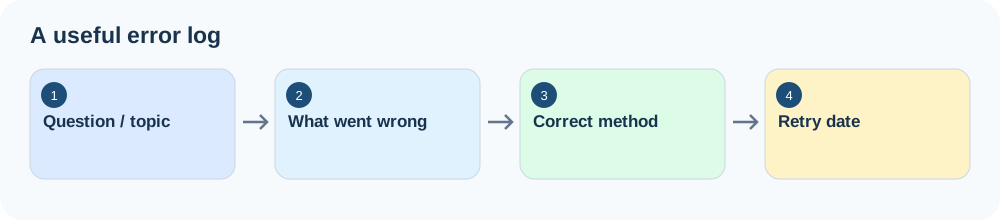
An error log records what went wrong, why it happened and what you will do next. Log repeatable problems rather than copying every wrong answer. Review your entries weekly, practise the fixes and mark issues as improved once you can handle similar questions independently.
You finish a practice paper, check your answers and see the same type of mistake again. You may have corrected it last week, but the problem returned. An error log helps you turn individual mistakes into a manageable revision plan.
The goal is not to collect wrong answers. It is to stop the same problems costing you marks again.
1. What Is an Error Log?
An error log is a short record of mistakes and uncertain answers from practice. Instead of writing only “Q8 wrong”, you record the cause and the action that could prevent a repeat.
| Unhelpful note | Useful error-log entry |
|---|---|
| Q8 wrong | Used percentage increase when the question asked for percentage of the final amount. Redo five reverse-percentage questions. |
| Science careless mistake | Copied the unit incorrectly. Check the requested and final units before moving on. |
2. Keep the Log Simple
Start with five fields. You can use a notebook, a printed table or a spreadsheet; the best format is the one you will actually revisit.
| Field | What to record |
|---|---|
| Paper / question | Where the mistake came from |
| Topic | The relevant chapter or skill |
| What went wrong | The specific cause, not just the wrong answer |
| Error type | Knowledge, method, careless error or time pressure |
| Next action | A small task that addresses the cause |
Example of a completed log
| Question | Topic | What went wrong | Type | Next action |
|---|---|---|---|---|
| Paper 2 Q8 | Percentage | Used the wrong percentage base | Method | Redo 5 reverse-percentage questions |
| Paper 2 Q12 | Units | Copied cm instead of m | Careless | Check units at the end of each question |
| Paper 2 Q15 | Electricity | Could not recall a required concept | Knowledge | Revise concept, then try new questions |
| Paper 2 Q20 | Mixed | Last questions unfinished | Time | Use section time checkpoints |
3. Identify the Root Cause
Use a few consistent categories so patterns become visible. If a mistake fits more than one category, choose the cause that best explains what you need to fix.
| Error type | What happened | Useful response |
|---|---|---|
| Knowledge gap | Did not know or remember the content | Learn, recall and practise |
| Method error | Used the wrong approach | Relearn the method and try new questions |
| Careless error | Misread, copied or recorded incorrectly | Build a specific checking habit |
| Time pressure | Rushed or left questions unfinished | Adjust pacing and question order |
A careless error does not always need another long revision session. It may need a better check. See How to Avoid Careless Mistakes in Exams.
4. Turn Each Entry Into a Specific Action
“Revise algebra” is too vague. Write something you can actually start and check.
Instead of: Revise algebra.
Try: Redo six simultaneous-equation questions without notes, checking the signs when substituting. Retry a similar question in a few days.
Ask yourself: if you read this entry three weeks later, would you know exactly what to do?
5. Record Correct Guesses Too
A correct answer can still hide a weakness if you guessed or could not explain the method. Record uncertain answers that you would struggle to reproduce. You do not need to log every correct answer.
6. Decide What Is Worth Logging
Keep entries that reveal a recurring problem, a likely repeat mistake or an important gap. Skip unnecessary detail, outdated syllabus content and issues you have already checked and resolved. The log should remain short enough to use.
7. Review the Log Once a Week
Look for repeated topics and error types. If three entries involve wrong units, build a units check. If several percentage questions show the same method error, schedule targeted percentage practice.
- Which topic appears most often?
- Which error type keeps recurring?
- What is the single most useful thing to fix next?
Use your findings to update your study schedule rather than adding more revision at random.
8. Retire Problems That Are Genuinely Improved
Don't keep every entry marked as an active weakness forever. As a practical check, try similar questions independently on two separate occasions, preferably a few days apart. If you handle them correctly, mark the issue as improved. If it returns, reopen it. This is a suggested routine, not a universal examination rule.
9. Adapt the Log to Your Subject
| Subject | What to record |
|---|---|
| Maths | Incorrect setup, operation, unit or interpretation |
| Science | Misunderstood concept, diagram, relationship or explanation |
| English / Chinese | Grammar structure, vocabulary or comprehension question type |
| Essay-based work | Missing content, weak evidence or unclear structure |
| MCQ | The distractor pattern that caught you |
For MCQ errors, see MCQ Strategies: How to Eliminate Wrong Answers.
Create Your Own Error Log
Download the ready-to-use workbook with dropdown categories, a retry tracker, example entries and a weekly dashboard. Save your own copy before entering your results.
Use this small browser-based template to draft an entry. It does not submit your answers to the website. Copy the result into your notebook or preferred document.
Common Questions
What should I include?
The paper or question, topic, specific cause, error type and next action. Add the correct method if it helps you recognise the issue again.
How often should I update it?
After a practice paper or question set, ideally while you still remember your reasoning. Review patterns about once a week.
How many mistakes should I record?
There is no fixed number. Prioritise likely repeat mistakes and important gaps rather than logging everything.
Should I log correct answers?
Include guesses and answers you could not explain, because they may hide a weakness.
When can I remove an entry?
Mark it as improved after successfully applying the method to similar questions on separate occasions. Reopen it if the error returns.
Paper or digital?
Whichever you will maintain. A notebook is simple; a spreadsheet makes sorting patterns easier.
A useful error log is not a list of failures. It is a list of specific problems you can work on. Record the cause, choose an action, test the fix and update the log as you improve.
Related Guides
- How to Learn From Mistakes After a Practice Paper →
- Practice Papers vs Revision →
- How to Avoid Careless Mistakes →
Put this guide into practice with these free resources.
Practise, Review, Improve
Use your next practice session to find one recurring problem and write a specific action to fix it.
A weekly triage example
Imagine your log has eight active entries: three percentage-method errors, two unit slips, two unrelated knowledge gaps and one unfinished question. Do not treat all eight as equally urgent. The repeated percentage errors suggest a targeted practice block; the unit slips suggest a brief checking habit; the other gaps can be scheduled separately.
One possible plan: Monday—six reverse-percentage questions; Wednesday—retry two without notes; Friday—use a mixed set and check whether the same mistake returns. Add a “check units” step to each calculation-based question throughout the week.
Use the downloadable error log template if you prefer a spreadsheet. Keep the log as a decision tool: each entry should lead to a correction, a retry or an intentional decision to postpone it.